



|
|
Troubleshooting Blown DC Fuses in a RV.

It happens. Sooner or later, you will find a blown fuse in your RV. Truth be told, it is pretty amazing this does not occur more often given the haphazard manner in which RV manufacturers build their rigs. One can only imagine the wires flopping around as the RV goes down the road - eventually causing an open or short. Fortunately, most modern RVs have a blown-fuse/short detector in their RVs - in the DC distribution panel. We are limiting our discussion to DC circuits as most AC circuits have a breaker, and the troubleshooting techniques do differ somewhat. WFCO is a major supplier of electrical distribution panels for RVs, and they typically have blown fuse indicators on the fuse board.
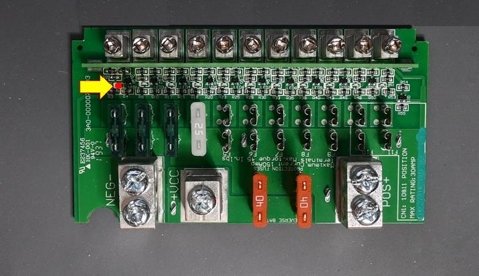
As shown above, each fuse has an associated fuse indicator LED that will light under certain conditions. The fuse blown indicator is typically a PNP transistor as shown below that is applied across the fuse. In normal conditions, there will be no voltage across the fuse. But when the fuse blows, the transistor will start conducting, placing a 500K load across the fuse and illuminate the fuse. The 470K resistor completes a circuit with itself in series with the load or short, which typically has a much lower resistance. The end result is the current flow through the wiring is low - around 20uA (micro-Amps). This is not enough to damage the wiring, and the 470K resistor becomes the new load, and the short becomes the path to ground.

The LED behavior is:
If the fuse blows and no short occurs (or a temporary short from bouncing the RV down the highway), then the LED's behavior becomes interesting.

If the load is attached - that is if the circuit is active (other than the blown fuse), the LED will be on. This is because there is a path to ground consisting of the load.

But if the load is not attached - for example, the switch for the light is off, then the LED will NOT be on because there is no path to ground.

But if there is a short, and the short occurs before the switch, then the LED will be on regardless of the position of the switch as there is always a path to ground via the short. But if the short occurs after the switch, then the LED will be on or off, depending on the state of the switch. This is a very important distinction as analyzing the behavior of the LED will provide insite as to the cause of the malfunction.
All About Fuses Video.
Troubleshooting Video.
Alternative Method
It turns out we can construct a detector that will allow us to determine if we have a short or simply a blown fuse. I have constructed two of them, one just an incandescant light, and the other a buzzer. The buzzer version is useful if you are troubleshooting the circuit and cannot see the light at the panel.
Caution: While the risk to circuit wiring is low due to the low current these test devices present, caution must be excersized when using them. Never leave such test devices connected and unattended.
Constructing the Light Bulb Short Detector.
The schematic below is very simple. A 12V Incandescant light is placed across the fuse and acts as the load. It requires about 9V to operate, so it will light up if there is a short, but will NOT light up if there is simply a blown fuse - regardless of whether the load is attached or not. A PolyFuse is included which is a resettable fuse to provide some degree of protection if the device encounters an overload condition.

The behavior of the light will be as follows:
Construction Details.

Attach the light bulb to the left over terminals. There are holes in the board to allow weaving the light bulb's wires, forming a strain relief. Finally, heat shrink over the circuit board (no need for clear heat shrink if you do not want to use it, as there are no LEDs on the board).
Constructing the Buzzer Short Detector.
The schematic below consists of a 5V buzzer and LED placed across a diode bridge (D1-D4), which allows us to insert the detector into the fuse block either way. The buzzer is in series with a 7.5V zener, which in effect turns the buzzer on for loads under around 50 ohms. The LED will come on regardless of what the load is. A PolyFuse is included which is a resettable fuse to provide some degree of protection if the device encounters an overload condition.
 Short Detector Schematic
The behavior of the buzzer will be as follows:
The buzzer therefore will allow us to differentiate between a blown fuse and a short.
Notes:
Assembly is pretty simple. Insert the smallest components first, saving the buzzer and connector tabs for last. Otherwise you could have a hard time inserting the small components if the buzzer were in the way.

Construction Details.
When you are done soldering the components and have determined the board works, cut a piece of transparent heat shrink (so you can see the LED), then slip over the board to protect it. These are useful detectors, so there is no reason not to build both, since they only cost a few dollars. The ATM/ATO/Maxi fuse block kit will end up costing more than the detectors.
| ||||||||||||||||||||||||||||||||||||||||||||||||||||||||||||||||||||||||||||||||||||||||||||||||||||||||||||||||||||||


